Not long ago when I first run the Windows Experience Index (WEI on Windows 7) on my Computer, and after about a 10-minute run (or so), I got frustrated that Windows reported an error about hardware and that it cannot rate my system.
I tried basic efforts at that time, like updating my drivers, but no avail.
Fast forward to 6 months later. I was window-shopping for a notebook, and due to comparison, I took a look at the Windows Experience Index on some models.
When I arrived home, I got back to my old problem on how to get the WEI rating of my desktop PC to compare to the notebooks I have seen. I searched at google and read through some forums where, just like searching for a coin in the dark, I tried several suggestions for nothing.
I sat back and, maybe a bit of intuition, I decided to set the BIOS to default settings.
I ran WEI again, and alas, I got the rating finally.
Going back to the BIOS, I was really curious what setting in the BIOS that it prevented from WEI to rate my PC. After almost two hours of trial and error approach, changing settings from IDE to AHCI modes, disabling virtualization, disabing E-SATA/G-SATA, and all those other settings.
Finally, I found the culprit. JUST DISABLE QUICK BOOT. Yeah, you read it right.
Quick boot option in my motherboard seems like it skips deep RAM test, if I am not mistaken (gotta find this out when I have time).
I think WEI is so deliberate in knowing your system first before rating it, and by doing a QUICK BOOT, it may have skipped some information needed by WEI.
My hardware specs are shown below.
CPU: Core i5-750 @ 2.67 GHz
Motherboard: Gigabyte P55-UD3P (BIOS version: F3)
RAM: A-DATA 2GB x 2 in Dual Channel
GPU: Powercolor Radeon 4850, 1GB GDDR3
Hard Disk: 320GB Western Digital Scorpio 7200 RPM
Windows 7 Ultimate 64-bit
On my next blog, I will show (based on my experiments) that incomplete information on CPU-Z is somewhat related to WEI.
Till next blog....
Sunday, August 7, 2011

Thursday, April 7, 2011
Better Than Alien Technology
I had a dream of putting up a business. With a slogan as stated on the title. To be continued.
Thursday, January 20, 2011
Quantum Physics
I bet an average educated person probably heard about Quantum Physics - the physics of the sub-atomic world.
At first, when I heard about Quantum Physics, I was a "detractor" or so to say, a critic for this gimmick, which I thought to be only about theories and no scientific explanation to support it.
But, after I started reading (and got addicted to it), I realized Quantum Physics is the real thing. Our generation should probably be thankful to the geniuses of the past 19th century because of their contributions - Max Planck, Albert Einstein, Neils Bohr, and so on.
When I started reading about Quantum Physics, I was really amazed of it's development, especially about Max Planck's initial ideas which led him to the Planck's constant. Glad that he did not gave up on his initial theory after his experiments from assumed light as a wave that later persuaded him to "initially" change it (light) to a "quantized" energy to simply support his theory. I think that was the birth of Quantum Physics. For centuries, it was thought that Light is has all the characteristics of a wave alone, until Planck came, where he stated that Light particles (late named "photons" ) were radiated in quanta.
So here we go, the applications of Quantum Physics now are actually amazing.
I wondered before how did they started the Periodic Table of Elements, only to know that Quantum Physics was the foundation of it. Modern machines in the industry and medical fields benefits from the development pf Quantum Physics.
The Electron Microscope, MRI, EEG are all the products of Quantum Physics. Of course, Quantum Physics is a broad knowledge yet to be discovered and "fully" understood. The debates continues up to this day, simply due to the empirical nature of the theorized ideas because of the sub-atomic essence of Quantum Physics.
The Higgs boson's existence or non-existence (which in turn, realized the construction of the most expensive scientific instrument ever made - The Large Hadron Collider. This might ultimately explain the theory of our universe.
Till next blog. Probably I'm gonna update this...
At first, when I heard about Quantum Physics, I was a "detractor" or so to say, a critic for this gimmick, which I thought to be only about theories and no scientific explanation to support it.
But, after I started reading (and got addicted to it), I realized Quantum Physics is the real thing. Our generation should probably be thankful to the geniuses of the past 19th century because of their contributions - Max Planck, Albert Einstein, Neils Bohr, and so on.
When I started reading about Quantum Physics, I was really amazed of it's development, especially about Max Planck's initial ideas which led him to the Planck's constant. Glad that he did not gave up on his initial theory after his experiments from assumed light as a wave that later persuaded him to "initially" change it (light) to a "quantized" energy to simply support his theory. I think that was the birth of Quantum Physics. For centuries, it was thought that Light is has all the characteristics of a wave alone, until Planck came, where he stated that Light particles (late named "photons" ) were radiated in quanta.
So here we go, the applications of Quantum Physics now are actually amazing.
I wondered before how did they started the Periodic Table of Elements, only to know that Quantum Physics was the foundation of it. Modern machines in the industry and medical fields benefits from the development pf Quantum Physics.
The Electron Microscope, MRI, EEG are all the products of Quantum Physics. Of course, Quantum Physics is a broad knowledge yet to be discovered and "fully" understood. The debates continues up to this day, simply due to the empirical nature of the theorized ideas because of the sub-atomic essence of Quantum Physics.
The Higgs boson's existence or non-existence (which in turn, realized the construction of the most expensive scientific instrument ever made - The Large Hadron Collider. This might ultimately explain the theory of our universe.
Till next blog. Probably I'm gonna update this...
Monday, April 26, 2010
Symbian Threatened?
For the past 8 years, we know that majority of the Smartphone market is controlled by the then independent company Symbian (before Nokia bought Symbian a couple of years ago).
Almost 70% of the total Smartphone industry uses Symbian operating System.
Fast forward to the present, most Smartphones now are going into touch-screen, where the Android/Blackberry/Apple OS (for iPhone) as well as Windows Mobile are doing well. With the recent accolades of the new (except Windows Mobile) other OSes, do you think the Symbian stronghold is threatened?
I myself is a Symbian S60 user, from the Nokia 3660 days up to this time on my N82. By far, I am satisfied with it. In fairness, I haven't tried the Android/Blackberry/OSApple/Windows Mobile.
As in my case, I am more on the "loyalty" thing. Should these threatening OSes overtake Symbian in the near future why not? It's a healthy competition that benefits the consumers.
We'll see in a couple of years.
From left to right:
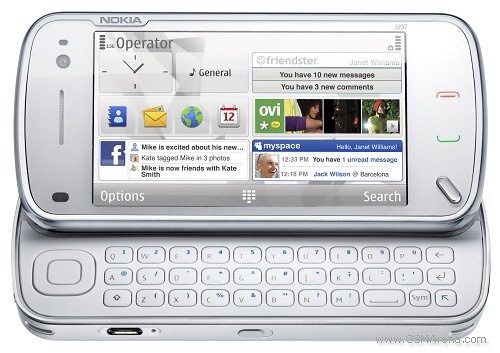
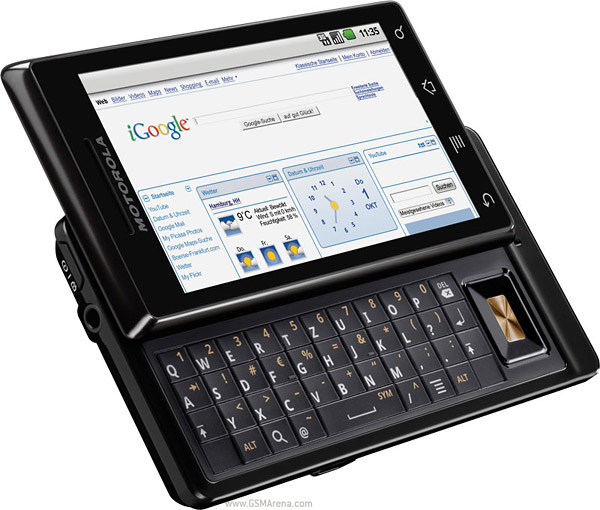
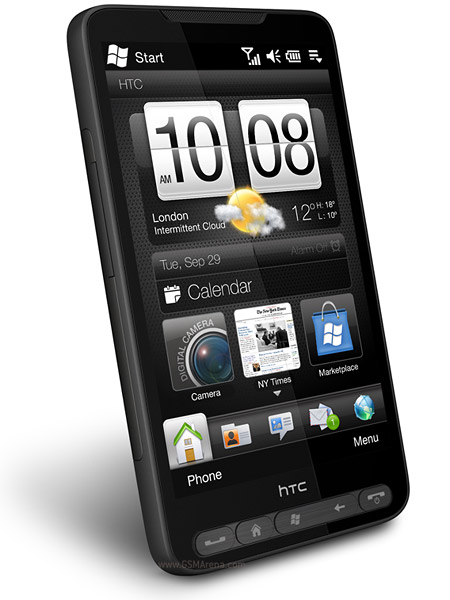
BlackBerry Bold 9700: BlackBerry OS, Apple iPhone: iPhone OS
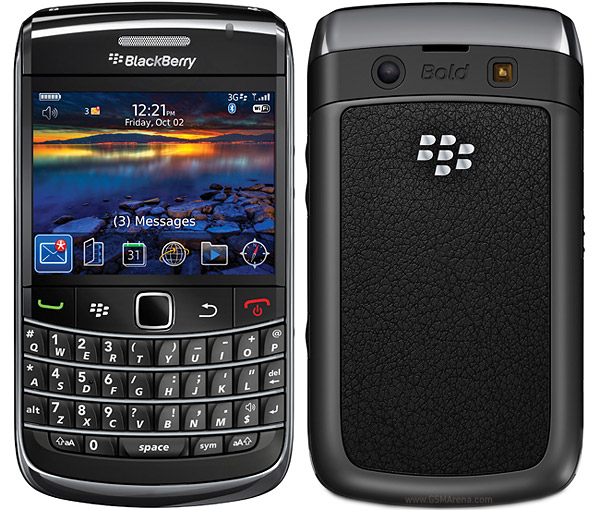
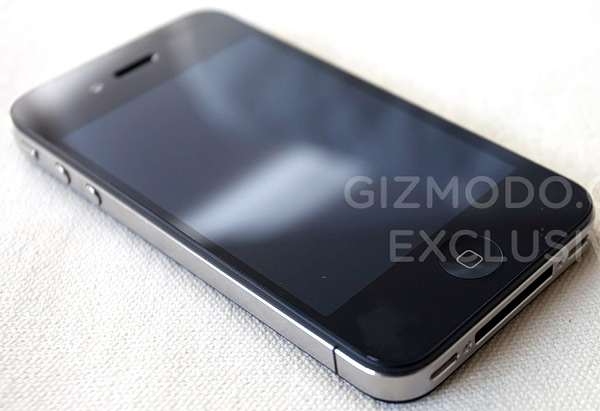
(Note: The blogger is not, in an way, endorsing nor affiliated to www.gsmarena.com and to the products and their manufacturers listed above.
Friday, March 12, 2010
Nokia Maps / Ovi Maps now Totally Free
As I posted on my past blog, I compared Nokia Maps against the Route66 GPS application. And one of the disadvantages of the Nokia Maps (now called Ovi Maps on newer models) is that you have to pay for navigation and voice navigation services.
Months ago, Nokia announced that the they will no longer charge you for navigation / voice navigation. Thanks Nokia.
So if your handset is capable of GPS navigation, install now!
For Symbian S60 3rd Edition / Java phones
http://europe.nokia.com/support/product-support/maps-support
For Symbian S60 5th edition
http://maps.nokia.com/ovi-services-and-apps/ovi-maps/downloads?ca=navq1&intc=nokiacommaps-fw-ilc-na-acq-na-europenokia-g0-19-getthelatest_101&lid=nav_navq1_link_getthelatest_other_na&t=nav#/default/
Good luck.
Months ago, Nokia announced that the they will no longer charge you for navigation / voice navigation. Thanks Nokia.
So if your handset is capable of GPS navigation, install now!
For Symbian S60 3rd Edition / Java phones
http://europe.nokia.com/support/product-support/maps-support
For Symbian S60 5th edition
http://maps.nokia.com/ovi-services-and-apps/ovi-maps/downloads?ca=navq1&intc=nokiacommaps-fw-ilc-na-acq-na-europenokia-g0-19-getthelatest_101&lid=nav_navq1_link_getthelatest_other_na&t=nav#/default/
Good luck.
Saturday, May 30, 2009
GPS Mobile Navigation - Nokia Maps vs. Route 66
Anyone interested in GPS (Global Positioning System) Mobile navigation will know that two of the most common GPS applications now are Nokia Maps and Route 66 Navigation. There are other GPS applications besides these, like Garmin, TomTom, Navigon, and so on. But when it comes to mobile (I mean, right on your cellular phone), Nokia Maps and Route 66 are the two major players.
Once, I owned a Nokia 6110 Navigator, and it has a Route 66 Navigation application (renamed to Nokia Navigator). Then I got this Nokia N82 with pre-loaded Nokia Maps. This comparison is based on my experience on both handsets with different GPS applications.
Here are the major differences.
Nokia Maps is free, BUT....
You need to pay the navigation. Navigation is when you want to go to one place from your current position, where a voice can guide you turn-by-turn until you reach your destination. Nokia has plans if you want to subscribe -- monthly, yearly terms.
You can upgrade your Nokia Maps application to a newer version once available, and that's for free. Add as many maps (per country) as you want for free.
Route 66 in contrast, you have to buy the maps on the internet. Once you have bought, Navigation is free.
Now, taking away the cost, which of the two gives better GPS services?
In my experience, Route66 is more user-friendly than Nokia Maps. It might be because I had already used Route66 before. But who knows, anyone started using Nokia Maps might find it user-friendly than Route66. Also, browsing (scrolling) the maps on Route66 are faster than Nokia Maps.
On the other hand, Nokia has more detailed Maps than Route66. I sometimes wonder why, since both maps of Nokia and Route66 are supplied by Navteq.
Nokia is turning serious on GPS. When the 6110 Navigator was outdated, all Nokia phones with GPS capabilities are using Nokia Maps.
THE GOOD THING
Can't decide enough which one to use? Then use install BOTH in your GPS-capable cellphone and get a hands-on experience.
(My GPS gadgets - Nokia 6110 Navigator/Nokia N82/XAiOX Wonde-X Bluetooth GPS Receiver).
Links:
http://europe.nokia.com/find-products/devices/nokia-6110-navigator-r6
http://europe.nokia.com/find-products/devices/nokia-n82
http://www.xaiox.de/wonde-x.htm
http://www.navteq.com/
http://europe.nokia.com/explore-services/maps
http://www.66.com/route66/
Now, taking away the cost, which of the two gives better GPS services?
In my experience, Route66 is more user-friendly than Nokia Maps. It might be because I had already used Route66 before. But who knows, anyone started using Nokia Maps might find it user-friendly than Route66. Also, browsing (scrolling) the maps on Route66 are faster than Nokia Maps.
On the other hand, Nokia has more detailed Maps than Route66. I sometimes wonder why, since both maps of Nokia and Route66 are supplied by Navteq.
Nokia is turning serious on GPS. When the 6110 Navigator was outdated, all Nokia phones with GPS capabilities are using Nokia Maps.
THE GOOD THING
Can't decide enough which one to use? Then use install BOTH in your GPS-capable cellphone and get a hands-on experience.
(My GPS gadgets - Nokia 6110 Navigator/Nokia N82/XAiOX Wonde-X Bluetooth GPS Receiver).
Links:
http://europe.nokia.com/find-products/devices/nokia-6110-navigator-r6
http://europe.nokia.com/find-products/devices/nokia-n82
http://www.xaiox.de/wonde-x.htm
http://www.navteq.com/
http://europe.nokia.com/explore-services/maps
http://www.66.com/route66/
Thursday, March 5, 2009
Monitor CPU and Hard Disk Temperature in Ubuntu

(This is for Ubuntu 8.04 Hardy Heron, but may work for other versions too. For Intrepid users, see the bottom part.)
I have been using Ubuntu Linux since last year on my Acer 4710 laptop and I am not just satisfied, I am happy with it. One thing that makes Ubuntu (as any Linux distro is), is the ease of adding applets on yuor desktop panel. Just like the taskbar icons in Windows.
I have installed these monitoring applets so I can know in real-time if my hardware gets overheated or not.
-------------------------------------------------------------------------------------------------------------------------------------
Note: These applets require installation of lm-sensors. At console, type
sudo apt-get install lm-sensors
After install, at console, run
sensors-detect
and follow instructions
-------------------------------------------------------------------------------------------------------------------------------------
1. Hardware sensors monitor (sensors-applet, hddtemp)
>> Used to display current temperature of CPUs, cores, and hard disk.
2. CPU Freq Monitor (emifreq-applet)*
>> Used to scale down your CPU speed depending on your needs.
To add these to the panel, right click to an empty space to your panel and select "Add to panel...". Simply select "Hardware sensors monitor" and CPUFreq monitor". You may need to add also "CPU Frequency Scaling Monitor"*
Now you can configure these applets once they are on the panel. Simply right-click to an applet and select "preferences" wherever possible. If your CPU is multi-cored, you may add each applet per core and configure them individually.
Happy computing!
--------------------------------------------------------------------------------------------------------------------------------------
* For Ubuntu 8.10 Intrepid users, you may don't need to install the "emifreq-applet". Just by adding "CPU Frequency Scaling Monitor" to the panel, it already has the option to scale down your CPU frequency.
--------------------------------------------------------------------------------------------------------------------------------------
Subscribe to:
Posts (Atom)